

Vulnerability scanning is just an automated way to proactively find and list out security weaknesses in your software, networks, and systems. A good way to think about it is like a security guard systematically checking every digital door and window for a potential break-in before a burglar gets the chance. These weak points, or vulnerabilities, are the openings attackers look for.
Understanding Vulnerability Scanning Fundamentals

At its heart, vulnerability scanning is all about spotting security flaws before the bad guys do. It’s a non-negotiable part of modern cybersecurity and really the first step in getting a handle on your digital risks. A scanner automatically probes your IT setup, hunting for known weaknesses by comparing what it finds against a huge database of documented security problems.
This isn’t just a simple technical check-up; it’s a core security practice. You can see how important these tools have become just by looking at the market. The global vulnerability scanner software market was valued at around USD 1.29 billion in 2024 and is expected to nearly double by 2033. This boom is happening because cyberattacks are on the rise and businesses need a proactive way to defend themselves.
What Scanners Look For
Vulnerability scanners are built to sniff out a whole range of security issues that could become an entry point for an attack. They work like automated detectives, searching for clues that point to a potential weakness.
Here’s what they typically focus on:
- Outdated Software: Scanners check for software, plugins, or operating systems that are behind on critical security patches.
- Common Misconfigurations: They spot systems with weak passwords, unnecessarily open ports, or default settings that haven't been changed.
- Known Vulnerabilities: The scanner cross-references everything it finds with public databases, like the Common Vulnerabilities and Exposures (CVE) list.
- Compliance Gaps: Scans can also help make sure your systems are meeting security policies and regulatory standards.
A vulnerability scan gives you a prioritized list of flaws. This lets you focus your energy on fixing the most critical risks first, turning security from a guessing game into a clear, data-driven strategy.
Scanning vs Other Security Tests
It's really important not to mix this automated process up with other security tests. For instance, knowing the difference between penetration testing vs vulnerability scanning is crucial. A scan is an automated, wide search for known problems—almost like checking a building's blueprints for design flaws. Penetration testing, on the other hand, is a manual, hands-on attempt to actually exploit those flaws, like hiring someone to actively try and break into the building.
Both are vital, but they play different roles in a good, layered security plan. You can learn more about how this applies to your website in our guide to running a thorough https://wpfoundry.app/wordpress-vulnerability-scanning/ process.
How The Vulnerability Scanning Process Works
To really get what vulnerability scanning is all about, it helps to look under the hood at how the process actually works. You can think of it like a full-body medical checkup for your website or network. The scanner is the doctor, methodically checking the health of your digital assets to find problems before they turn into emergencies.
The whole thing unfolds in a few clear, logical stages. Each step builds on the one before it, taking raw data and turning it into a practical security plan.
Stage 1: Defining The Scope
Before a doctor runs any tests, they need to know what part of the body they're examining. It's the same with vulnerability scanning. The very first step is defining the scope. This just means figuring out which assets—websites, servers, applications, network devices—need to be checked.
You wouldn't want a doctor running tests on the wrong patient, right? This initial mapping makes sure the scan is focused and complete, so no critical part of your setup gets missed. It's all about creating a clear inventory of what you need to protect.
Stage 2: Running The Scan
With the scope set, the scan execution begins. The vulnerability scanner gets to work, systematically poking and prodding the assets you've targeted. It sends out requests and carefully analyzes the responses it gets back, looking for any sign of a weakness. It's the digital equivalent of drawing blood or taking an X-ray.
The scanner then checks everything it finds against a huge, constantly updated database of known security issues, like the Common Vulnerabilities and Exposures (CVE) list. It’s looking for thousands of potential problems, including:
- Outdated software versions that have known security holes.
- Misconfigured security settings that leave digital doors wide open.
- Missing security patches that have yet to be applied.
- Default credentials that were never changed from the factory settings.
This visual shows the basic flow of how the scanner identifies assets and creates a final report.
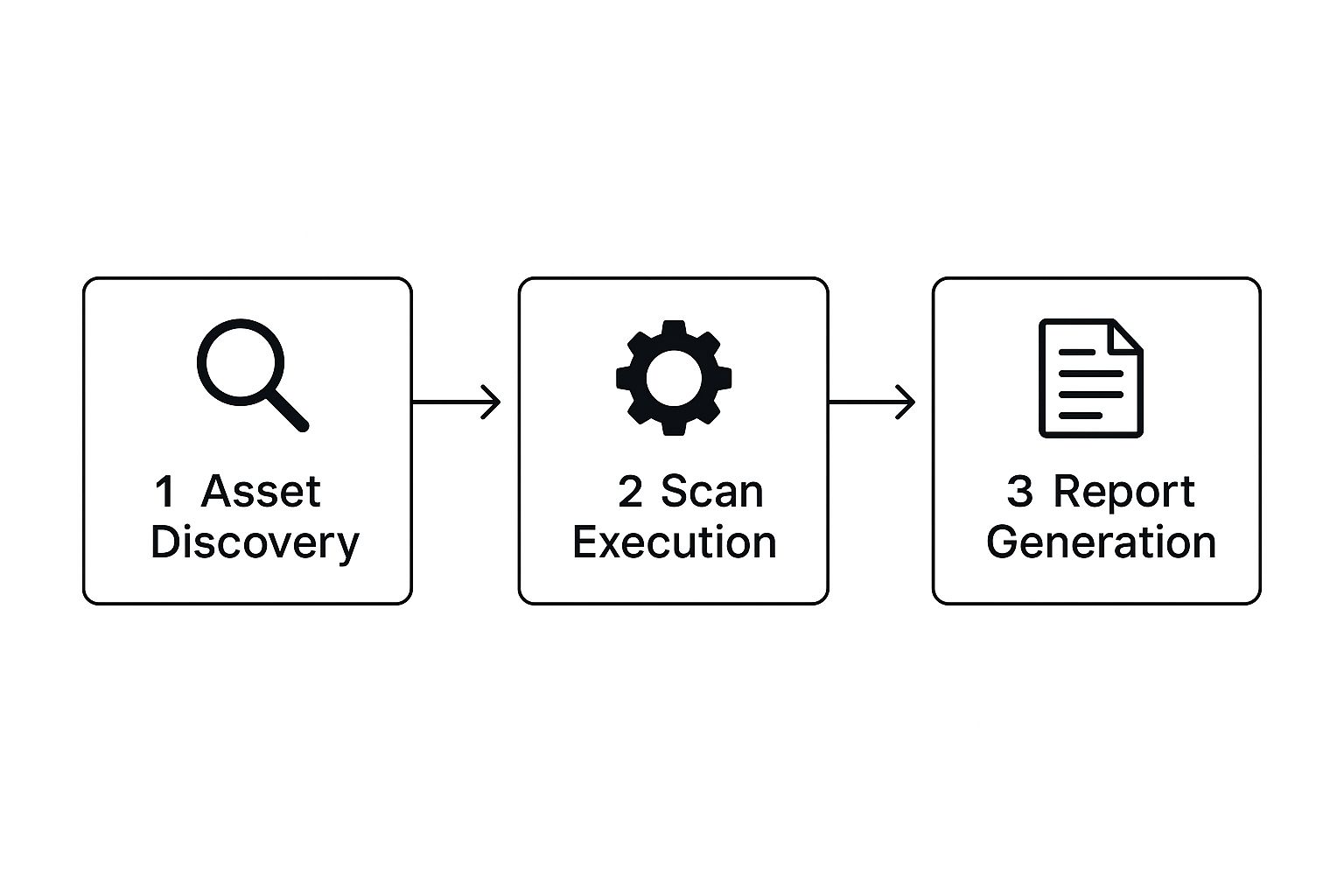
This simple workflow shows how a scan turns system information into real security insights.
Stage 3: Analyzing And Prioritizing Results
After the tests are done, a doctor doesn't just hand you a stack of confusing lab results. They analyze the data, figure out what it means, and tell you which issues need your attention first. The analysis and prioritization stage of a scan is exactly like that.
The scanner takes its findings and gives each weakness a severity score, often using the Common Vulnerability Scoring System (CVSS). This is a critical step because it separates the minor stuff from the major threats that you need to deal with right now.
A scan report can be overwhelming without prioritization, sometimes listing hundreds of potential flaws. By assigning risk scores, the process turns a massive data dump into a focused, prioritized to-do list for your security team.
Understanding this process is important, as it's a key part of any good software quality assurance processes aimed at building secure and reliable applications.
Stage 4: Reporting And Remediation
The final stage is all about reporting and remediation. The scanner creates a detailed report that spells out every vulnerability it found, how severe it is, which assets are affected, and—most importantly—how to fix it. This is your doctor’s treatment plan.
This report becomes the blueprint for your repair efforts. It gives your team the clear, actionable information they need to start patching software, tweaking configurations, and closing the security gaps the scan uncovered. This is where discovery turns into action, making your organization's defenses stronger against potential cyberattacks.
Exploring The Different Types Of Vulnerability Scans
Think about securing a building. You'd check the locks on the outside doors, but you'd also want to make sure the internal office doors and filing cabinets are secure. Your digital assets need the same layered approach.
Vulnerability scans aren't a one-size-fits-all tool. They come in different flavors, each giving you a unique view of your security posture. Knowing the difference is crucial for building a defense that actually works. The main distinction comes down to perspective: is the scan looking from the outside in, or the inside out?
External Vs Internal Scans
An external vulnerability scan acts like a would-be attacker from the internet. It probes your public-facing systems—things like your web server, firewall, or email server—to find openings an outsider could exploit. It's like having a security pro jiggle the handles and check the windows from the street.
On the flip side, an internal vulnerability scan runs from inside your network. This type of scan is designed to find risks that could be used by an insider threat (like a disgruntled employee) or by an attacker who has already found a way past your outer defenses. This is like letting that same security pro walk the halls inside, checking for unlocked doors or sensitive documents left on desks. Internal scans find problems external ones can't see, like weak permissions or unpatched software on staff computers.
The real power comes from using both. By combining external and internal scans, you get a full 360-degree picture of your security—seeing the threats from the outside world and understanding the risks already inside your trusted network.
Authenticated Vs Unauthenticated Scans
Another key difference is whether the scanner has login credentials for the systems it's checking. This changes the depth of the scan entirely.
An unauthenticated scan is often called a "black-box" scan. It approaches your systems with zero special access, seeing them exactly as an anonymous attacker would. It’s great for quickly finding obvious misconfigurations and low-hanging fruit.
An authenticated scan, also known as a "credentialed" scan, is much more detailed. The scanner logs into the system with valid user credentials. This gives it an insider's view, allowing it to thoroughly check software versions, patch levels, and configurations. It provides a far more accurate assessment and cuts down on false positives. It's the difference between looking at a house from the curb versus being handed the keys to inspect every room.
To help clarify, here’s a quick breakdown of the main scan types.
Comparison Of Key Vulnerability Scan Types
This table compares the primary types of vulnerability scans, outlining their main purpose, the perspective they offer, and when each type is most effectively used.
| Scan Type | Perspective | Primary Purpose | Best Used For |
|---|---|---|---|
| External | "Attacker View" | Identifies vulnerabilities on internet-facing systems. | Securing the network perimeter against outside threats. |
| Internal | "Insider View" | Finds weaknesses inside the network perimeter. | Mitigating insider threats and post-breach damage. |
| Unauthenticated | "Anonymous User" | Simulates an attack with no credentials. | Finding easily exploitable, public-facing flaws. |
| Authenticated | "Logged-in User" | Scans with system credentials for a deep analysis. | Getting a detailed and accurate view of system health. |
Ultimately, a mix-and-match approach using these different scans gives you the most complete and actionable security intelligence.
Specialized Scan Types
Beyond these main categories, some scans are built for specific parts of your tech stack. As technology changes, so do the tools we need to protect it.
- Web Application Scans: These focus entirely on websites and web apps, hunting for common issues like SQL injection and cross-site scripting (XSS), often guided by frameworks like the OWASP Top 10.
- Database Scans: These dig into your database systems to find problems like weak passwords, improper user permissions, and configuration errors that could lead to a major data breach.
- Cloud Scans: With so much infrastructure now on platforms like AWS and Azure, these scans are built to find cloud-specific misconfigurations, like public S3 buckets or overly permissive IAM roles.
Each of these scan types provides a different piece of the security puzzle. A smart vulnerability management plan doesn't just pick one; it layers them to make sure every angle is covered.
The Most Important Benefits Of Regular Scanning
It’s one thing to understand the mechanics of vulnerability scanning, but the real question is: why should you care? The answer is that regular scanning isn't just another technical chore. It's a strategic investment in the health and long-term survival of your business.
Think of it like preventative medicine for your website and servers. Regular checkups help doctors spot health problems before they become full-blown emergencies. In the same way, consistent scanning finds those small security cracks before a hacker can turn them into a catastrophic data breach. This proactive approach is always cheaper and less stressful than cleaning up after an attack.
Proactive Threat Prevention
The biggest and most obvious win is proactive threat prevention. A vulnerability scan gives you a clear map of your security weaknesses, letting you patch them up before attackers can ever find them. This is absolutely critical when you consider the staggering costs of a data breach, from fines and recovery fees to lost customer trust.
This proactive mindset is no longer optional. The market for security and vulnerability management, with scanning at its core, was valued at USD 18.76 billion in 2024. Experts predict it will explode to nearly USD 46.92 billion by 2034. That growth tells a clear story: businesses are realizing that finding and fixing weaknesses is the only way to stay safe.
By finding and fixing vulnerabilities early, you get out of the reactive, "firefighting" mode that plagues so many IT teams. Instead, you can build a forward-thinking security strategy that reduces risk and keeps your operations running smoothly.
Streamlining Compliance And Audits
For many businesses, regular security checks aren't just a good idea—they're the law. If your industry is governed by data security regulations, consistent vulnerability scanning is often a non-negotiable requirement.
- PCI DSS: If you process credit card payments, you're likely required to run quarterly scans with an Approved Scanning Vendor (ASV).
- HIPAA: In healthcare, organizations must regularly assess risks to patient data, and scanning is a key part of that process.
- GDPR & CCPA: These data privacy laws demand that you take technical measures to protect personal information, which absolutely includes finding and fixing known vulnerabilities.
Running a regular WordPress scan for vulnerabilities gives you the paper trail you need to prove you've done your due diligence during an audit. This helps you dodge massive fines and, just as importantly, builds trust with clients and partners who need to know their data is in good hands.
Gaining Clear Security Visibility
It’s an old saying, but it’s true: you can’t protect what you can’t see. Vulnerability scanning acts like an inventory check for your entire network, giving you a complete list of every device, application, and service you have running. This clear picture is the bedrock of any solid security plan.
Scan reports provide an objective, data-driven look at your security posture. They categorize vulnerabilities by severity—like Critical, High, or Medium—so you know exactly what to focus on first. Instead of guessing where your limited time and budget should go, you can tackle the most dangerous flaws first, getting the biggest security bang for your buck. It turns a messy, overwhelming list of potential problems into a simple, actionable to-do list.
The Future Of Vulnerability Management
The world of cybersecurity doesn't stand still, and vulnerability scanning is evolving right along with it. The days of simply running a scheduled scan and ticking a compliance box are fading fast. The future is all about making security smarter, quicker, and more deeply integrated into the way we actually work.
Looking ahead, the single biggest shift is from periodic, one-off checks to a continuous, automated approach. Think of it as moving from an annual physical exam to wearing a fitness tracker that monitors your health 24/7. This constant vigilance is essential as digital environments become more dynamic, with code being deployed multiple times a day.
The Rise Of Intelligent Scanning
Artificial Intelligence (AI) and Machine Learning (ML) are set to completely redefine what a vulnerability scan can do. These technologies are pushing scanners beyond just checking for known issues against a static database. Instead, they are learning to think more like an attacker.
This brings two huge benefits:
- Smarter Threat Detection: AI can spot complex patterns and subtle anomalies that traditional scanners would likely miss, helping to uncover far more sophisticated vulnerabilities.
- Reduced Alert Fatigue: By learning what’s “normal” for your specific environment, AI-powered tools can slash the number of false positives. This lets your security team focus on genuine threats instead of chasing ghosts.
The goal is to transform vulnerability scanning from a noisy alarm system into a precise diagnostic tool. AI helps prioritize the handful of critical risks that truly matter from a sea of low-level alerts.
A specialized sector is already popping up to tackle the unique security challenges of AI itself. The AI vulnerability scanning market was valued at roughly USD 2.41 billion in 2024 and is projected to hit around USD 9.09 billion by 2034. This growth is being driven by the need to protect AI models from adversarial attacks and data manipulation, which could have devastating consequences in fields like finance and healthcare.
Shifting Left With DevSecOps
Another major trend is embedding security directly into the development pipeline, a practice known as DevSecOps. Instead of waiting until an application is finished to scan it for flaws, security checks are now happening automatically at every stage of the development lifecycle.
This “shift left” approach means developers get instant feedback on security issues in their code. They can then fix problems early on, when it’s cheapest and easiest to do so. It makes security a shared responsibility, not just a final gatekeeper, and helps build more secure software from the ground up. This proactive method is a core principle behind effective tools like the WP Foundry WordPress vulnerability scanner, which helps you spot issues before they become major headaches.
Adapting To An Expanding Attack Surface
The modern IT environment is no longer neatly contained within a single data center. The explosion of new technologies has created a vastly larger and more complex attack surface for organizations to defend.
Future-focused vulnerability management must account for these new fronts:
- Cloud-Native Security: As businesses move to the cloud, scanning tools have to understand and assess cloud-specific configurations in platforms like AWS and Azure.
- API Security: APIs are the connective tissue of modern applications, and securing them is critical. Specialized API scanning is becoming a must-have for preventing data breaches.
- IoT and OT Devices: The spread of Internet of Things (IoT) devices and Operational Technology (OT) in industrial settings creates new, often unmanaged entry points that demand dedicated scanning strategies.
Ultimately, the future of vulnerability management is proactive, integrated, and intelligent. It’s about building security into the very fabric of your operations, not just bolting it on as an afterthought.
Implementing Scanning With WP Foundry
Knowing what a vulnerability scan is is one thing. Actually running one is what keeps your sites safe. This next part is all about putting that knowledge to work. We’ll walk through how to set up and run your first scan right inside the WP Foundry platform, turning the theory into real-world action.
WP Foundry bakes a powerful scanner directly into its management dashboard. No third-party tools or complicated setups needed. You can kick off a full security check with a few clicks, making proactive security a reality whether you're managing one site or one hundred.
Activating Your First Scan
Getting started is simple. Once your WordPress sites are connected to the WP Foundry desktop app, the security features are easy to find. The whole point is to let you protect your sites without needing a degree in cybersecurity.
Here’s how to launch a scan, step by step:
- Select Your Target Site: From the main dashboard, just pick the WordPress site you want to check.
- Navigate to the Security Tab: Look for the security or vulnerability scanning section for that site and click it.
- Initiate the Scan: Hit the "Start Scan" button. That’s it. The platform gets to work, probing your WordPress core files, plugins, and themes for thousands of known weaknesses.
The scan runs in the background, checking your site’s code against an always-current vulnerability database. It's the practical side of what is vulnerability scanning—taking a tedious manual audit and turning it into a fast, repeatable task.
Interpreting Your Scan Results
After the scan finishes, WP Foundry lays out the findings on a clean results dashboard. This is where the raw data turns into useful information. Instead of a mess of technical jargon, you get a simple, prioritized report showing you exactly where the problems are.
A good scan report shouldn't just dump data on you; it should give you a clear path forward. By sorting vulnerabilities by severity, WP Foundry lets you tackle the biggest fires first, making your security efforts far more effective.
Every vulnerability found gets a severity rating to help you prioritize. Understanding these ratings is key:
- Critical: These are the big ones. Flaws that could let an attacker take over your site completely. Fix these immediately.
- High: Very serious issues that could lead to data theft or major system damage. They need to be fixed right away.
- Medium: These problems pose a real risk and should be addressed as soon as you can to prevent them from being exploited.
- Low: Minor weaknesses or informational notes. Good to fix when you have time, but they aren’t an urgent threat.
By following these steps, you can use WP Foundry to turn your knowledge of what is vulnerability scanning into a concrete defense for your websites. This simple process connects the dots between theory and practice, giving you a powerful tool for keeping your sites secure.
Common Questions About Vulnerability Scanning
Even after you get the hang of what vulnerability scanning is all about, you'll probably still have a few questions. That's perfectly normal. Let's run through some of the most common ones that pop up.
How Often Should I Run a Vulnerability Scan?
This is a big one, and the honest answer is: it depends. There’s no magic number that works for everyone. The right frequency for you is a mix of your security needs, any compliance rules you have to follow, and how often your systems change.
For instance, if you process payments, a regulation like the Payment Card Industry Data Security Standard (PCI DSS) might require you to run external scans at least quarterly. But if you’re constantly pushing new code or adding plugins to your website, you might want to scan monthly or even weekly to catch problems as they appear.
For most businesses, a full scan once a month is a great starting point. You can always add more frequent scans for your most critical assets—like your main website or customer database—to make sure nothing important gets missed.
Vulnerability Scanning Vs Penetration Testing
People mix these two up all the time, but they’re completely different tools for different jobs.
Think of it like securing a house.
A vulnerability scan is like walking around your house with a checklist. You check every door and window to see if it's on a list of known weak locks. It's automated, fast, and gives you a broad overview of potential weak points based on known issues.
A penetration test, or pentest, is like hiring a professional lockpicker to actually try and break into your house. They won't just check the locks; they'll try to pick them, see if they can slip through an unlocked window upstairs, or find a blind spot in your security camera's view. It's a hands-on, creative process meant to find out if a real attacker could get in and what they could do once inside.
Can a Vulnerability Scan Find Every Security Issue?
Nope, and it's important to be realistic about this. No single tool can ever guarantee 100% security. Vulnerability scanners are excellent at finding what they're designed to find: known vulnerabilities, common mistakes in configuration, and outdated software.
But they have blind spots. A scan will almost certainly miss:
- Zero-Day Vulnerabilities: These are brand-new exploits that nobody knows about yet, so they aren't in the scanner's database of threats.
- Business Logic Flaws: An automated tool can’t understand the unique purpose of your application. It won't spot a flaw where, for example, a user could manipulate a shopping cart's logic to get a discount they aren't entitled to.
- Complex Attack Chains: A scanner sees individual problems. A clever attacker might link several minor, low-risk issues together to create a major security breach.
That’s why vulnerability scanning should always be just one part of a bigger security plan.
Ready to put this into practice? WP Foundry has a powerful vulnerability scanner built right into the dashboard, making it simple to keep your WordPress sites safe. You can start running scans and securing your sites in just a few minutes.