

Let’s talk about small business website management. It’s the constant, ongoing work of keeping your website secure, up-to-date, and running smoothly so it actually helps your business. This isn't a "set it and forget it" task; it’s the essential maintenance that keeps your hardest-working employee—your website—in top shape.
Your Website Is More Than Just a Brochure

Let's be honest, managing a business website can feel like another full-time job. It’s a dynamic tool that acts as your online sales floor, customer service desk, and brand ambassador, all rolled into one. Neglecting it is like leaving your physical shop unattended—things eventually break, security gets sloppy, and customers simply go somewhere else.
This guide skips the dense technical jargon. Instead, we'll lay out a practical framework for managing your website effectively. We’re going to cover the core pillars that keep your site secure, fast, and reliable, turning it from a simple online presence into a real business asset. It's about creating a consistently positive experience for every single visitor.
The Growing Importance of a Managed Website
For a small business to compete today, a website isn't optional—it's the baseline for credibility and growth. The data backs this up without a doubt.
By 2025, it's projected that 73% of small businesses in the U.S. will have a website. That's a significant jump from 64% back in 2020. This shift shows just how critical a web presence has become. If you're curious about the numbers, you can learn more about small business website statistics and see how you stack up.
A poorly managed website can do more harm than no website at all. Slow load times, broken links, and security warnings don't just create a bad impression; they actively drive potential customers away and tarnish your brand's reputation.
This guide gives you a clear roadmap for handling essential maintenance without the usual overwhelm. By breaking it down into five core pillars, you can build a routine that protects your investment and actually helps you hit your business goals.
The Five Pillars of Website Management
To make things manageable, we’ll focus on five key areas. If you get a handle on these, your site will remain a powerful tool for your business.
- Core Maintenance: Think regular updates and backups. This is your insurance against crashes and data loss.
- Proactive Security: This involves implementing measures to shield your site and, more importantly, your customer data from threats.
- Performance Optimization: A fast, responsive site keeps visitors engaged. A slow one sends them packing.
- Budget Management: You need to understand and plan for the real costs of keeping a website running properly.
- Content & SEO Workflows: This is all about keeping your content fresh and optimized so you can attract your ideal audience.
By concentrating on these areas, you can develop a sustainable approach to managing your website. The next sections will give you actionable strategies for each one, putting you firmly in control of your digital presence.
To give you a quick overview, here's how these five essential tasks fit together and what they mean for your business.
Core Pillars of Website Management at a Glance
| Management Task | Primary Goal | Business Impact |
|---|---|---|
| Core Maintenance | Ensure stability and prevent data loss | Minimizes downtime and protects business continuity |
| Proactive Security | Protect against cyber threats and breaches | Builds customer trust and safeguards sensitive data |
| Performance Optimization | Deliver a fast, seamless user experience | Reduces bounce rates and improves conversions |
| Budget Management | Control costs and maximize ROI | Ensures financial sustainability and smart spending |
| Content & SEO | Attract and engage the target audience | Drives organic traffic and generates qualified leads |
Focusing on these five pillars provides a structured way to manage your website effectively, turning it from a potential headache into a powerful asset for growth.
Building Your Core Maintenance Routine
If you just leave a website to fend for itself, it’s going to start falling apart. That’s just a fact. Like any other important business asset, it needs regular, hands-on care to keep running smoothly. Good website management starts with a solid maintenance routine—a simple, repeatable checklist that stops tiny glitches from snowballing into total disasters.
Think of this routine as the bedrock of your whole online presence. Without it, your brilliant design and clever marketing can be wiped out in an instant by a site crash, a security breach, or a catastrophic data loss. You don't have to be a tech wizard to do this; you just have to be a diligent business owner protecting your investment.
Mastering Software and Plugin Updates
One of the most common—and most important—jobs is keeping your site's software current. That means the core CMS (like WordPress itself) and all the plugins and themes that give your site its look and functionality.
These updates aren’t just about adding shiny new features. More often than not, they’re packed with critical security patches that close up vulnerabilities discovered by developers. In fact, outdated plugins and themes are behind a shocking 52% of WordPress vulnerabilities. Skipping these updates is like leaving your front door wide open. You're just asking for trouble.
Just imagine launching a huge holiday sale, only to have your site go down because an old e-commerce plugin is conflicting with the newest WordPress update. It happens. But it’s also completely preventable with a consistent update schedule.
The Art of Reliable Website Backups
Your website backup is your ultimate safety net. It’s the one thing that can pull you back from the brink after a server crash, a hacker attack, or even a simple "oops" moment that deletes half your work. It's wild how many businesses either forget to run backups or store them in the wrong place, leaving themselves totally exposed.
A solid backup strategy really comes down to two things:
- Frequency: How often should you back up? It all depends on how often your site content changes. An e-commerce store with daily orders needs daily backups, no question. A simple portfolio site that you only tweak once a month might be fine with a weekly backup.
- Storage: Whatever you do, never store your only backup on the same server as your website. If that server goes down, your backup disappears with it. The gold standard here is the 3-2-1 rule: keep three copies of your data, on two different types of media, with at least one copy stored off-site (like in the cloud).
WP Foundry makes this part easy. You can generate both database and file backups right from the app, giving you a quick way to save a snapshot of your site before you hit the update button or make any big changes.
This flow chart lays out a basic process for figuring out what you need and putting the right tools and strategies in place for your routine.
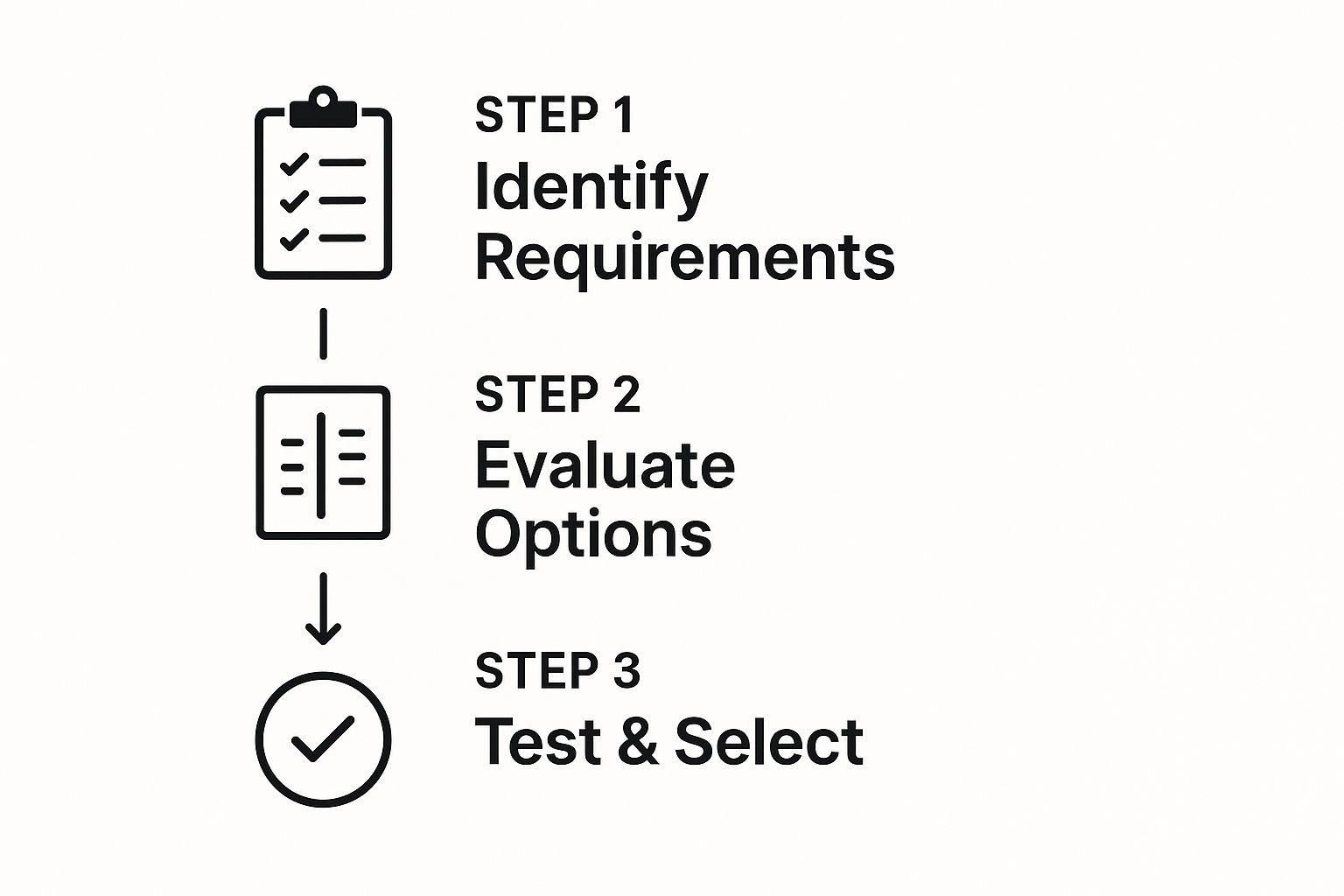
Starting with identifying your needs and moving through to testing ensures you're not just grabbing a random tool, but building a strategy that actually fits your business.
Automation Versus Manual Checks
So, should you automate all your maintenance tasks or do them by hand? For most small businesses, the best answer is a mix of both. Automation is brilliant for things like daily backups where you just need it to happen reliably, every single time. Setting up an automatic nightly backup to a cloud drive is a perfect use case.
But relying entirely on automation for updates can be a gamble. An automatic plugin update could easily conflict with something else and break your site, and you might not even notice for hours.
A smart routine combines the consistency of automation with the oversight of manual checks. Automate your daily backups, but manually run plugin and theme updates on a staging site first to test for issues before pushing them to your live website.
This balanced approach gives you efficiency without sacrificing control. If you want a detailed list of what to include in your routine, this WordPress maintenance checklist is a fantastic place to start.
By getting a regular schedule down for these core tasks, you shift from constantly putting out fires to proactively preventing them in the first place. That simple change is what smart website management is all about, and it's the key to keeping your online presence stable, secure, and ready to grow.
Implementing a Proactive Website Security Strategy

For a small business, a security breach is more than just a technical headache—it's a trust-destroying disaster. A proactive security plan is a critical piece of website management, protecting your data, your customers, and your hard-earned reputation.
The stakes are higher than you might think. Roughly 43% of all cyberattacks are aimed directly at small businesses. Even worse, a staggering 60% of those hit are forced to close their doors for good within just six months. Yet many businesses still leave their digital doors unlocked.
It's time to build a real defense plan that goes beyond just crossing your fingers.
Fortify Your First Line of Defense
The login page is the front door to your website, and it's where most attackers try to get in. Your first move should be enforcing strong password policies that your team can actually stick to. A "strong" password isn't just about length; it needs a complex mix of uppercase and lowercase letters, numbers, and symbols.
Next, add another layer of protection with two-factor authentication (2FA). This requires a second code—usually sent to a phone—before anyone can log in. It's a simple step that makes a huge difference, rendering stolen passwords practically useless.
Deploy a Trusted Security Plugin
If you're running a WordPress site, a dedicated security plugin is non-negotiable. Think of tools like Wordfence or Sucuri as your site's personal security team, actively watching for threats and blocking malicious activity around the clock.
These plugins give you a powerful suite of security tools:
- Web Application Firewall (WAF): This acts as a digital bouncer, filtering out bad traffic and known threats before they ever reach your website.
- Malware Scanning: They continuously scan your site's files for malicious code, alerting you to infections so you can deal with them immediately.
- Login Security: They offer brute-force protection, which automatically blocks IP addresses that try to guess your password too many times.
The key benefit here is visibility. A good security plugin pulls all your defenses into one dashboard, making it easy to see threats and manage your firewall. This is a massive time-saver for your day-to-day website management.
Encrypt Data with an SSL Certificate
An SSL (Secure Sockets Layer) certificate isn't just a "nice-to-have" anymore; it's essential. It encrypts the connection between a visitor's browser and your server, protecting sensitive information like passwords and payment details from being intercepted.
You know a site has SSL when you see the padlock icon and "https" in the address bar. Without it, browsers like Google Chrome will label your site as "Not Secure," which is a surefire way to scare off potential customers.
An SSL certificate does more than just secure data. It's a powerful signal of trust and credibility. For search engines, it's also a confirmed ranking factor, meaning sites with SSL are given a slight edge over those without it.
Most web hosts today provide free SSL certificates through services like Let's Encrypt, so there's really no excuse not to have one active.
Create a Security-First Mindset
Great security tools are only half the battle. Your team's habits and awareness are just as important. Building a strong security culture is a vital part of managing your website effectively.
Start by setting some clear guidelines:
- Limit User Access: Not everyone on your team needs administrator access. Use the principle of least privilege—give people only the permissions they absolutely need to do their job.
- Use Secure Networks: Make it a rule to never manage the website while connected to public Wi-Fi. These unsecured networks are hunting grounds for data thieves.
- Regular Training: Take a few minutes in team meetings to review security basics. A quick reminder about spotting phishing emails or using unique passwords can make a huge difference.
By combining the right tools with an educated and vigilant team, you build a robust defense that’s tough for attackers to break through. For a deeper dive into hardening your site, check out our guide on the ultimate WordPress security checklist.
Optimizing Your Site for Speed and Performance
Let's be blunt: a slow website is a business killer. We live in an age of instant gratification, and if your pages don't load almost immediately, your visitors are gone. They'll click away and probably never come back. That's why smart small business website management means treating performance as a constant, ongoing job, not just a one-off task.
The payoff is huge. A zippy site keeps people engaged, slashes your bounce rate, and gives you a direct, measurable boost in search engine rankings. Think of it as an investment in user experience that returns real dividends in loyalty and sales.
Figuring Out What's Slowing You Down
Before you can speed things up, you have to know what the bottleneck is. Guessing is a waste of time and energy. Luckily, there are some fantastic (and free) tools that give you a clear, data-backed report card on your site's health.
I always start with Google PageSpeed Insights. It's invaluable. It doesn't just give you a vague "slow" or "fast" rating; it provides detailed scores for both mobile and desktop and, more importantly, tells you exactly what to fix. You'll see specific issues highlighted, from massive image files to clunky code that's dragging everything down.
Key Performance Optimization Techniques
Once you have that diagnostic report in hand, you can start making targeted fixes. The good news is that many of the most effective changes are surprisingly simple and don't require you to be a coding genius. The main goal is always to reduce the amount of stuff a visitor's browser has to download and think about.
Here are a few of the core techniques that deliver the biggest bang for your buck:
- Image Compression: This is the low-hanging fruit. Unoptimized, massive images are the #1 reason sites feel sluggish. Use a tool like TinyPNG or a WordPress plugin to shrink your image files without any noticeable loss in quality. It's a game-changer.
- Leverage Browser Caching: Caching tells a visitor's browser to save static parts of your site—like your logo, CSS files, and fonts—on their local computer. The next time they visit, the page loads in a flash because all those assets are already there.
- Minify Your Code: Minification strips out all the unnecessary characters from your code files (HTML, CSS, JavaScript), like extra spaces and developer comments. This makes the files smaller and faster for browsers to download and process.
A mere one-second delay in page load time can cause a 7% reduction in conversions. For an online store doing $100,000 per day, that single second could cost over $2.5 million in lost sales each year. Performance isn't just a feature; it's a core business metric.
The Role of Hosting and CDNs
Your own optimization efforts can only get you so far if your site is built on a shaky foundation. Your web hosting provider plays a massive role in how fast your site is. That cheap, shared hosting plan might look tempting, but it often leads to painfully slow server response times, especially when you get a sudden burst of traffic.
Upgrading to quality managed WordPress hosting can make a night-and-day difference. These hosts fine-tune their servers specifically for WordPress, giving you a much faster, more stable environment right out of the box.
To take it a step further, especially if you have a global audience, use a Content Delivery Network (CDN). A CDN is a network of servers spread across the globe that stores copies of your website's files. When someone from another country visits your site, the content gets delivered from the server closest to them, dramatically cutting down load times. It's the key to ensuring a consistently fast experience for every user, no matter their location.
For a deeper dive, our complete guide to WordPress site speed optimization lays out a more detailed roadmap. By combining these on-site tweaks with a solid hosting infrastructure, you'll have a high-performing website that keeps visitors happy and your business growing.
Managing Your Website Budget Without Surprises
Let's get real about the money. Smart small business website management is as much about financial planning as it is about the tech. If you don't get a firm handle on what your site actually costs to run, you're setting yourself up for nasty surprises that can completely derail your budget.
A website isn't a one-and-done purchase; it's an ongoing investment. Ignoring the recurring costs is a recipe for disaster. Suddenly, you're faced with tough decisions, like pulling back on your ad spend or letting a crucial plugin subscription lapse, which could tank your site's security overnight.
Core Website Expenses to Plan For
To build a realistic budget, you first need to know exactly what you’re paying for. Most websites for small businesses have a fairly predictable set of costs you can map out for the year.
Make sure your budget has room for these essentials:
- Web Hosting: This is basically the rent for your website's spot on the internet. It can be just a few dollars a month for simple shared hosting or climb into the hundreds for a powerful dedicated server.
- Domain Name Renewal: This is your website's address, and you have to renew it every year to keep it. It’s usually a small fee, but it's absolutely non-negotiable.
- Premium Plugins & Themes: While free tools are great, most serious businesses end up using premium software for things like e-commerce, advanced security, or specific design features. These typically require an annual fee for updates and support.
- Occasional Professional Help: Even if you're a DIY pro, you might hit a wall. Maybe a complex bug pops up or you need a designer for a brand refresh. It's smart to have a small "just-in-case" fund set aside for hiring an expert.
A well-managed website is a predictable expense, not a financial surprise. By tracking these core costs, you turn a reactive scramble into a proactive financial strategy, ensuring your digital presence is sustainable and effective.
DIY Builders vs. Professional Design
The initial build is often the biggest line item in a website budget. The cost to get started can vary wildly. A professional website design for a small business can run anywhere from $2,000 to over $9,000, with big, complex projects costing much more. On the flip side, DIY platforms can get you in the door for as little as $16 per month. You can discover more about these website cost statistics for a deeper dive.
Choosing between DIY and hiring a pro is a classic trade-off between upfront cost and long-term potential. Building a site yourself on a platform like Wix or Squarespace is cheaper to start, but you might find yourself limited in customization and scalability down the road. A professionally built WordPress site costs more initially but gives you complete control and the freedom to grow without limits.
This is where a tool like WP Foundry really helps. It empowers you to handle the day-to-day management of a professional-grade WordPress site more efficiently. By reducing the need to constantly call in a developer for routine tasks, you significantly lower your long-term operating costs and make the professional route much more accessible.
Creating a Sustainable Content and SEO Workflow
A website that just sits there is a website that’s going nowhere. Real small business website management goes beyond the technical stuff. It’s about building a digital presence that’s alive, constantly evolving, and pulling in the right kind of people. To do that, you need a solid, repeatable workflow for your content and SEO.
Without a process, creating content turns into a chaotic, last-minute scramble. The trick is to build a simple system you can stick to. A basic content calendar is a great place to start—even a simple spreadsheet works just fine. Use it to map out blog post ideas, service page updates, or new case studies for the next quarter.
Mastering On-Page SEO Essentials
Look, you don't have to become an SEO wizard overnight to see a real difference. Just focus on the fundamentals of on-page SEO—the things you have direct control over. These are the small, deliberate tweaks that signal to search engines what your pages are about, helping you show up for the right searches.
Here are a few key areas to dial in:
- Keyword Research: Start by using free tools to discover the actual phrases and questions your customers are typing into Google.
- Compelling Meta Descriptions: Write short, punchy summaries for your pages. Think of them as tiny ads that convince people to click your link in the search results.
- Proper Heading Structure: Organize your content with clear headings (H2s, H3s). This makes your articles much easier to read for both humans and search engine bots.
Nailing these basics builds a sturdy foundation for your site’s visibility. Once you have that in place, you can dig deeper into more comprehensive strategies for driving traffic and earning income through blogging to really scale your efforts.
Using Data to Guide Your Strategy
Guessing is your worst enemy when it comes to content. Stop wondering what your audience wants and start using data to find out for sure. Tools like Google Analytics and Google Search Console are completely free and incredibly insightful.
Think of your website analytics as a direct conversation with your audience. They show you which pages are hits, what search terms led people to you, and where they’re losing interest. This data is pure gold; it’s your roadmap for what to create next.
For instance, if you see that an old blog post about a niche service is still getting steady traffic every month, that’s a massive clue. It’s the market telling you what it wants. You could write a more in-depth follow-up, create a downloadable checklist, or simply expand the original post with fresh details. This data-driven loop ensures you're always putting your energy where it counts, creating a powerful cycle of growth.
Frequently Asked Website Management Questions
When you're running a small business, managing your website can feel like a whole other job. A lot of the same questions tend to pop up, and getting solid answers is the first step to creating a process that actually works for you. Let's tackle some of the most common ones.
How Often Should I Update My Website?
This is probably the most common question I hear, and the answer has two parts.
First, you have the technical stuff: your plugins, themes, and the WordPress core itself. You should be checking for these updates at least weekly. It might sound like a lot, but security patches are pushed out constantly. Falling behind, even by a few weeks, can leave a wide-open door for attackers.
Then there’s your content. This is a bit more flexible, but a good rule of thumb is to add something new or refresh an older page at least once a month. It tells search engines your site is alive and well, which is a big deal for your SEO.
Can I Manage My Website Myself?
Yes, you absolutely can. For most small business owners, DIY website management is totally doable with the right approach and the right tools.
You don't need to become a developer. The goal is just to get comfortable with a routine for the essential jobs: running backups, scanning for security issues, and handling those software updates. It’s about protecting your online investment.
A tool like WP Foundry is built for this exact scenario. It takes complicated tasks and boils them down into a simple workflow you can manage right from your desktop, which is a game-changer for anyone who isn't a full-time web pro.
What Is the Biggest Mistake to Avoid?
Easy. The single biggest mistake is neglect.
Treating your website with a "set it and forget it" mindset is a surefire way to end up with a site that’s slow, insecure, or just plain broken. Outdated plugins are the number one cause of security breaches. Stale content makes you look out of touch. And if you aren't monitoring performance, you could be losing visitors and customers every single day without a clue.
Proactive, consistent attention isn't optional—it's the core of good website management.
Ready to take control of your website maintenance without the technical headache? WP Foundry brings all your core management tasks into a single, intuitive desktop app. Save time and get peace of mind by streamlining your updates, backups, and security checks. Learn more at https://wpfoundry.app.